

Things have been quite busy at Smart Interactive Transformations. From giving presentations to industry colleagues on the state of bot building in 2024 and trying to separate the hype from the ripe to creating the first of many digital assistant capabilities for the business, this year has kicked off in full force. Before jumping in, I want to introduce our newest team member, ScheduLarry! That’s ScheduLarry in the photo, happy to be helping book follow-up meetings for people who call me when I’m in a scheduled appointment.
I mentioned before I’d be journaling my process of going from ideation to full implementation for a calendar assistant. The assistant would answer my calls if I was in a meeting and schedule a follow-up at a later date or time. In December, I covered a framework to approach requirements gathering to ensure you don’t miss any major items during effort planning and estimation. In my head, I had quite a lot of content to cover to explain the whys, hows, whats, and all that other stuff of going from an idea to running something in production. Then, of course, reality set in. I need this thing live. It doesn’t have to be perfect, but it needs to exist. I like to get people excited about automating conversations, so it makes sense to “eat my own dog food” as they say and automate a few interactions of my own sooner than later.
As an independent consultant, if I took the time necessary to build a robust production-grade deployment suitable for an existing business with hundreds of thousands or millions of customers, ScheduLarry would be live in several months. Instead, I humbly go live with ScheduLarry as a minimum viable product (MVP). I won’t be releasing every aspect of ScheduLarry publicly, at least not for some time. But don’t fear; I will provide plenty of tips, tricks, and reference architectures and configurations for succeeding with various interactional use cases.
Alright, so let’s talk about ScheduLarry, the solution! Here’s a high-level view of the primary components.
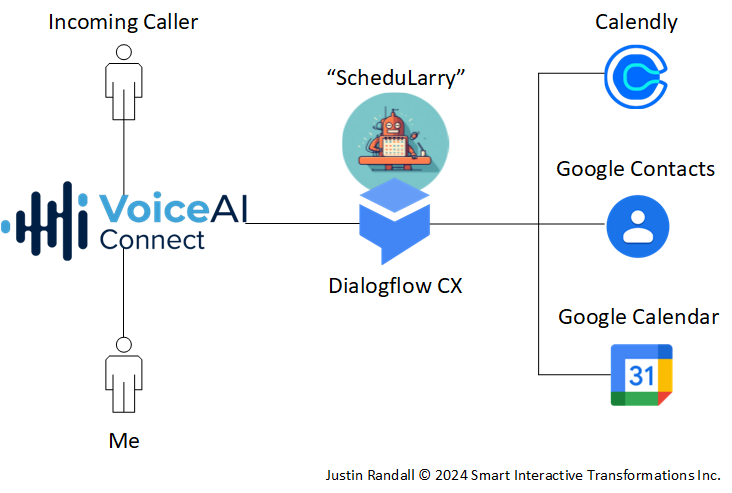
ScheduLarry intercepts incoming calls to my business number, checks my many calendars to see if I’m in a meeting, greets incoming callers, transfers them through if I’m available, or schedules a follow-up phone call or Google Meeting depending on certain conditions.
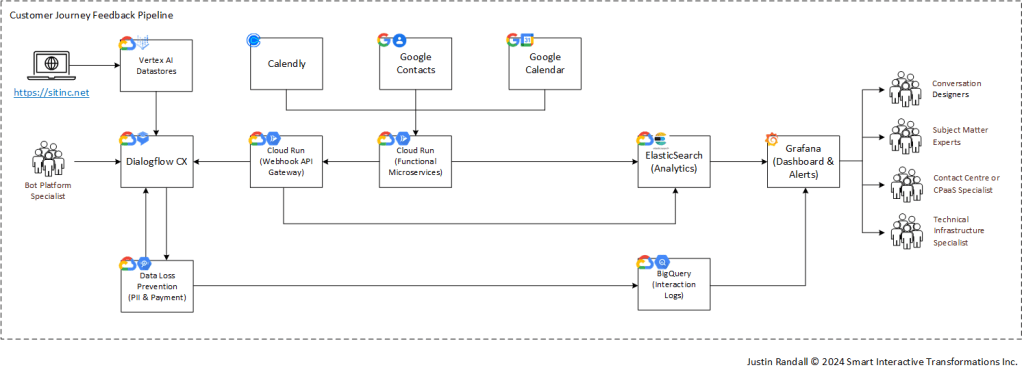
I’m using AudioCodes Voice AI Connect LiveHub as a telephony platform that connects incoming calls to Google Dialogflow CX. Within Dialogflow CX, I am making use of natural language understanding (NLU) intent classification, generative response (in certain conditions), and retrieval augmented generation (RAG) with Vertex AI Datastores. Through additional cloud infrastructure and software development, I integrate Dialogflow CX with Calendly, Google Contacts, and Google Calendar to facilitate the scheduling use case. Calendly integrates my multiple personal and business calendars, some with Google and some with Microsoft. Google Contacts lets me look up incoming caller IDs to identify the alleged incoming caller and access standard and custom data fields. ScheduLarry has access to a single Google Calendar for creating events and sending email invites to attendees on my behalf.
ScheduLarry currently comprises 24x Intents, 28x Flows, 92x Pages, and 8103x Training Utterances and uses built-in system entity types for recognizing dates and times. The Vertex AI RAG datastore indexed data from my website, https://sitinc.wordpress.com. I use generative responses in two cases: 1) Fallback for specific flows (not all), and 2) to improve the response generated from RAG datastores. I generated the training data entirely using large language models (LLMs) and prompt chaining. Know that this has been my approach for the last two production solutions I delivered, and it has consistently performed very well with minimal hand-tuning. Getting good training data used to take me days or weeks; now, it takes me minutes or hours at most. If you’re curious about where to start, I shared a post on LinkedIn a few days after the release of ChatGPT with my approach.
The general approach to bot responses is to use intent classification to trigger well-crafted copy to steer the conversation where I ultimately want it to go. Utterances not covered by pre-defined intents can trigger responses from my website based on semantic similarity or, under certain conditions, be entirely generated by a specially crafted fallback prompt. It doesn’t matter if you use intent classification + crafted copy vs. response generation – both can hallucinate in different ways. The more talked about hallucinations we hear about today are when generated responses include factually incorrect information. Intent classification tasks also hallucinate in the form of confident (high predict probability) misclassifications that invoke the well-crafted copy about something no one said.
Here is an example of a good conversation using intents and non-generative copy responses.
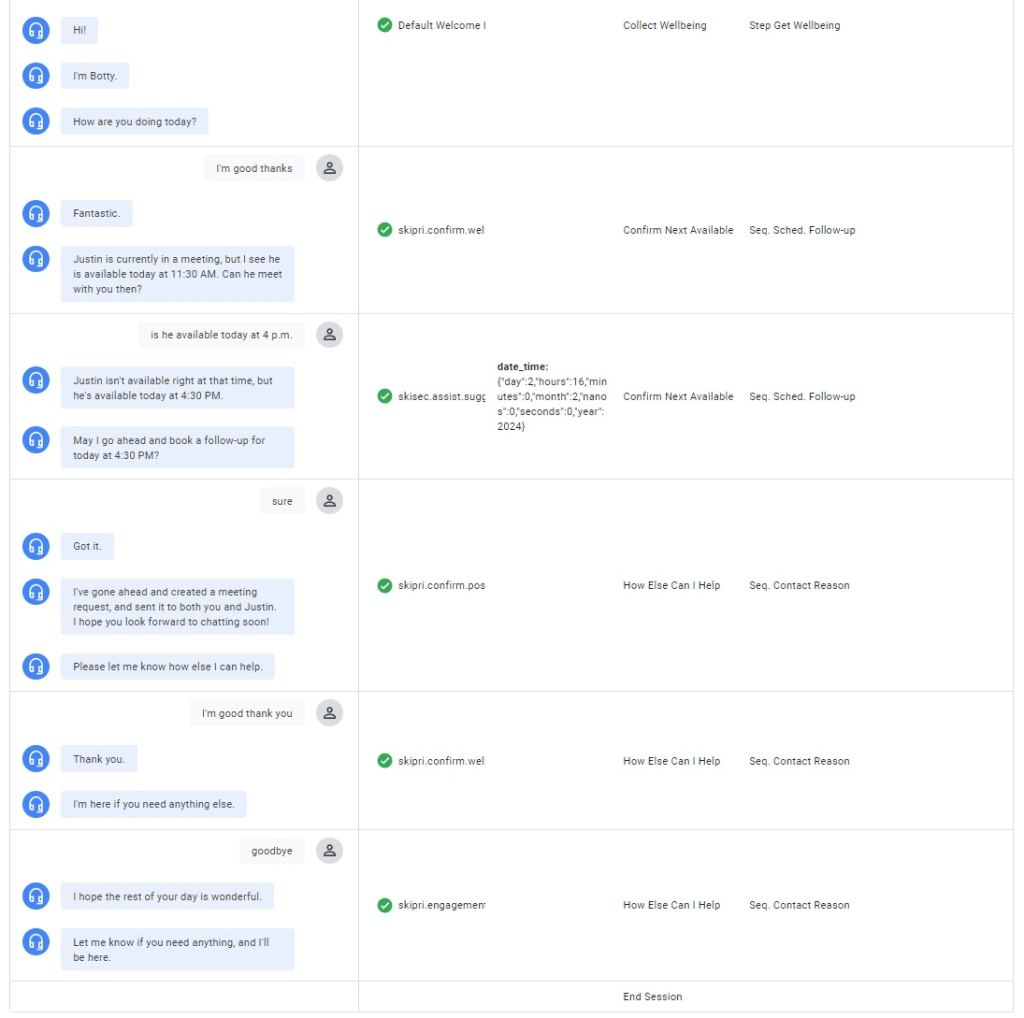
Upon close inspection, you might notice the bot introduces itself as Botty. While I first chose it out of laziness and picked a name with “bot” in it, when I looked up the word, I realised that my business was greeting people with the children’s term describing someone’s bottom. Yep. That bottom. Oops!
Anyway, generative responses are fun, but even with guardrails, which there are more advanced approaches I can and will eventually utilize, the result can still create weird, awkward moments like these. (I fixed this by mapping that intent to that point at the start of the flow – not something that happens in voice because the “Hello” is sent each time, but you will need to deal with this in some chat integrations, which is how this was tested).
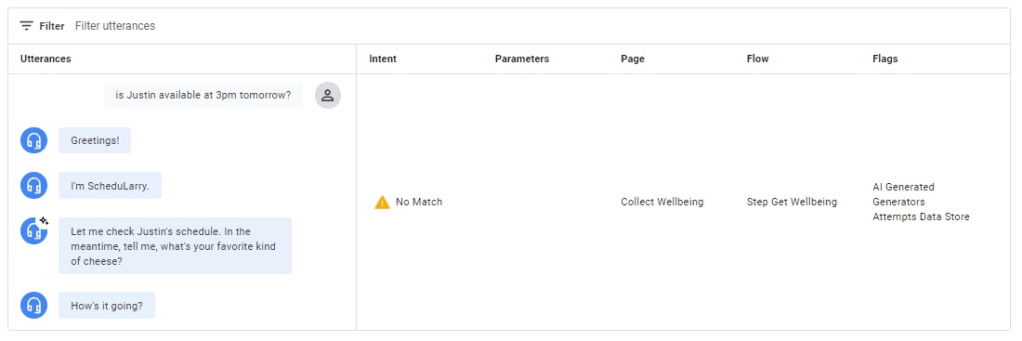
Yes, that’s right. Cheese anyone? My guardrails don’t allow for discussions on cheese! It provides an explicit list of allowed topics. Still, I am doing this in a naïve way for now, and some improvements can hopefully reduce (but not eliminate) this LLM’s curiosity about your favourite fromage.
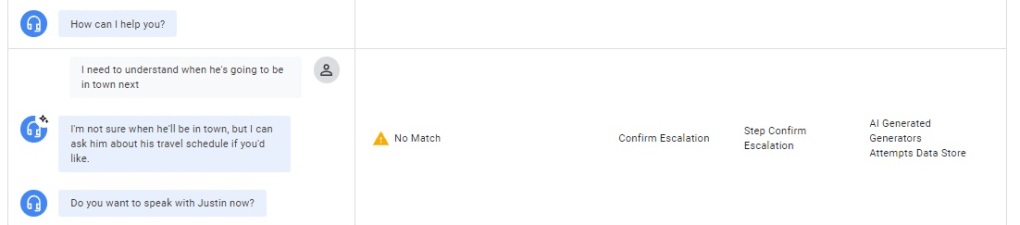
Sometimes, generative responses flow reasonably well enough:
If you’re interested in some of the initial requirements collected through brainstorming and synthesized data analysis, see this past blog post on the SECTION(AL) framework.
ScheduLarry is only helping me, but it could be helping others. One of the eye-opening moments I had in automating conversations happened in 2020, not too long after I went live with Penny, the first virtual voice assistant I built for a telecom, named after one of my daughters.
We had raccoons in the attic. Not just one, but many. They trashed our attic and pulled apart roof vents and parts of our siding. I never knew how physically strong raccoons were until I saw the results of them ripping apart aluminum with their hands. We needed them out of the attic, so we took to Google and searched for who could help deal with the unwanted house guests. Let’s start calling the phone numbers from the search results top-to-bottom:
- Company A – Voicemail – Hung up without leaving a message.
- Company B – Voicemail – Hung up without leaving a message.
- Company C – Voicemail – Hung up without leaving a message.
- Company D – Answered – The sole proprietor’s spouse said they were out doing groceries but scheduled a home visit the next day at 10 AM to assess the situation.
That was it, no more calling. Someone was coming to help us out. In the end, Company D made $600 in a couple of days and several thousands of dollars for thoroughly cleaning up and repairing the damage to our home and cleaning up hazardous waste. Companies A, B, and C have no idea they missed a pretty good opportunity simply by not being able to take a call and schedule a follow-up (site visit). Having experience operating a bot handling B2C service provider volume traffic on a relatively low budget previously, I could easily see how you could deliver an automated solution to this problem that even sole proprietors could afford and realize meaningful value. I told myself I would make this affordable to the smallest businesses someday.
Fast forward to yesterday, I gave a demo of ScheduLarry to a general contractor visiting my home, and he immediately asked me if he could use it. Instead of having to listen to voicemail, being able to drop callbacks or meeting follow-ups when he can’t answer the phone is much easier to manage. Also, everyone hates voicemail, right?
The way ScheduLarry helps me would have to be different than how it could help people like my general contractor, who has been giving out physical business cards and mugs for some time. How would calls be steered towards ScheduLarry for phone numbers that already go to someone’s personal cell phone? I’ve come up with two initial deployment models to address both scenarios.
Call Intercept Deployment
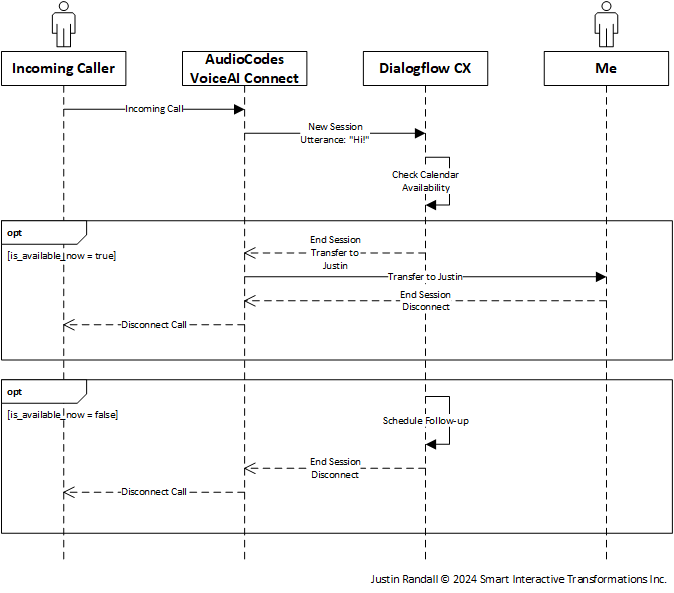
The intercept deployment model is how I am using ScheduLarry. All incoming calls go to a phone number dedicated to the bot. The bot answers checks my schedule, and proceeds accordingly. This way, I won’t be distracted by incoming phone calls if I’m in a meeting. Additionally, the incoming caller can still push to escalate and get through to me if necessary. A negative trade-off of the intercept deployment approach is that failures in the system can result in incoming callers being unable to reach you or schedule things on your calendar. Of course, these can be mitigated with robust infrastructure, but resiliency is one of the strong positives of the alternative deployment approach.
Call Forward Deployment
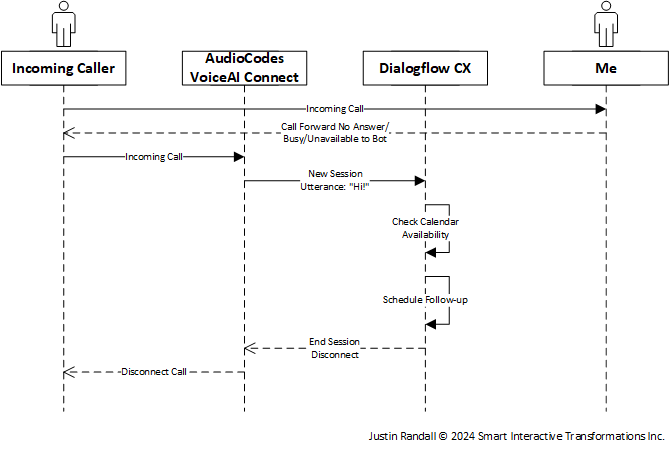
The call forward deployment is one way ScheduLarry can provide service to existing phone numbers without porting or swapping. In this model, the existing phone device sets up call forwarding for busy, no answer, and not reachable to go to the new dedicated phone number for the bot (no one ever sees this number). The bot answers the call and proceeds to check availability and book a follow-up call/meeting but doesn’t offer the ability to escalate. The ability to escalate could be implemented without changing phone numbers, if necessary, but would require a secondary phone client on the phone device. For example, a cell phone with a mobile telephone identity and a VoIP app like Webex or many others. I’m unsure if the effort is worth the support, given the assumption that the bot answered the call because the phone owner couldn’t answer the call.
Key Solution Pipelines
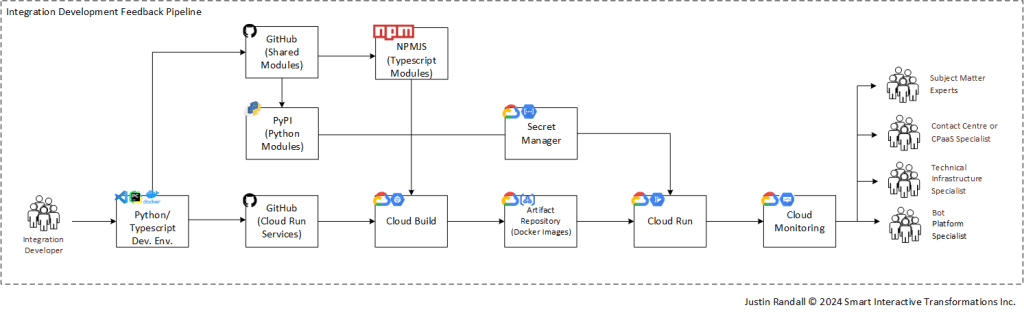
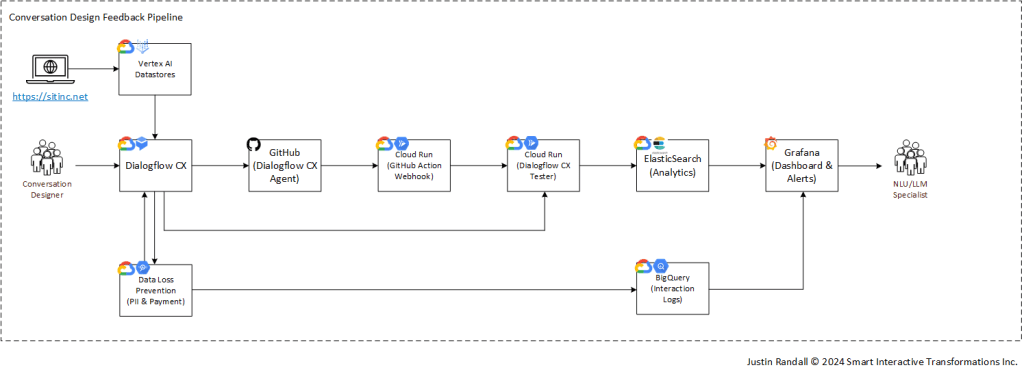
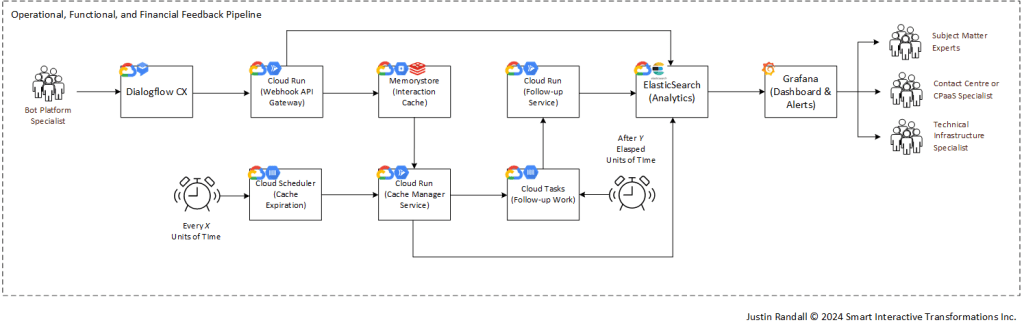
All the custom-developed components of ScheduLarry reside in Google Cloud Platform. In subsequent posts, I will dive deeper into these system feedback pipelines, technology selection, cost and capacity scalability factors, trade-off decisions, failure modes, risk analysis, and more. I am not suggesting the below architecture as an ultimate reference architecture. There is no such thing for any deployment – it all depends on the needs of scale and cost; the function is often mandatory. However, I endorse this architecture as a great place to start for high-fidelity prototypes that integrate with live systems. Today, the outcome is relatively insignificant if I lose a few data events going to ElasticSearch occasionally. If I need to provide data durability guarantees to analytics for customers, I should introduce a persisted events pipeline ahead of ElasticSearch to improve delivery reliability.
Here is a preview of the full scope of solution components that make up ScheduLarry as an MVP. Note that Google Cloud Monitoring is implied in each pipeline but is only included in the Integration Development Feedback Pipeline to simplify visuals.
It should also be implied that individuals on the origination side of the feedback loop (the left side) receive feedback in both automated and human-in-the-loop means by the output side of the loop. Right now, starting from scratch, the feedback loop is manual. It’s also all one person, so it happens in a tiny space between my ears. We need to change that relatively quickly to reduce the effort in maintaining the solution.
So, what’s next?
I’m excited about what’s next for ScheduLarry and future digital teammates. I have a laundry list of improvements I plan to make in the coming weeks and months, including (but not limited to):
- Deploying a chatbot on my website and looking up contacts by email
- Detecting and blocking abusive callers automatically
- Sending SMS Confirmations for Phone-only Meeting Confirmations
- Automated Clustering Analysis from the Interaction Logs
- Special Birthday Treatment… maybe singing a special song?
That list is nice, but there are also things I need to “finish” or “fix” depending on how you look at it. While I’m off to a good start, here are some areas where the use case I’ve already put in place falls short. For all those requirements I gathered before starting, we’ve barely scratched the surface.
- I’m checking all calendars for when I’m busy, but not when I’m “free” according to my defined Calendly schedule. It will technically let you book a meeting with me at 3 AM today (please don’t!). I need to update my application logic to consider my defined Calendly availability hours when I’m free, not just if I’m scheduled into a meeting during a search window.
- Some people won’t want to speak to ScheduLarry, no matter what I do, and that’s okay. I need to implement DTMF handling so that people don’t have to use speech, which doesn’t work as well for all accents and manners of speaking.
- Sometimes, I will receive a call from private or unknown numbers. When that happens, my meeting request won’t give me a phone number to call, and they won’t get a Google Meeting request because I didn’t look up the email without a phone number. I need to ensure I prompt for a phone number in those instances.
- The system handles date ranges, time ranges, single dates and times but doesn’t handle statements like “any Wednesday or Friday between 2 PM – 4 PM or 6 PM and 8 PM”. I’m building a solution that needs to handle how people speak, so I need to be able to parse this into an intersection of dates and times to use as a filter against busy times and scheduled availability.
- I need to do something to stop ScheduLarry from asking people about their favourite cheese.
Want to help me make ScheduLarry better? Email me your contact info (name, phone number, and email address), and once I confirm you’re added to my business Google Contacts list, you can test booking meetings with me when you call my business number. You can still book meetings with me even without having your contact populated, but I will be the only one getting the email notification/reminders. If you actually want to talk to me, I’m cool with that, too! 😉
As always, I hope you found this helpful. Please feel free to reach out or say hi and talk to me about how we can succeed in making life and the bottom line better with meaningful automation.

 Smart Interactive Transformations Inc.
Leave a comment