
Hello? ScheduLarry, is there anybody in there? How are you doing?
It’s been a few weeks since my last post introducing ScheduLarry, and I promised more information on some of the tooling and approaches behind getting started and going live with a conversational AI solution. For those unfamiliar, ScheduLarry is my voice assistant that intercept calls to my business number and validates my availability against all my calendars, then subsequently schedules follow-up meetings and sends email confirmations to known clients. The plan is to go behind the scenes of taking ScheduLarry from MVP to a much more sophisticated experience over the course of several blog posts.
It took roughly one full week of effort spread across a few to go from completing requirements collection to delivering a minimal viable product (MVP) I felt comfortable enough with going live. Before using that as a baseline, please keep in mind I’ve been building these systems for over four years now. It’s a substantial change from the first voice bot I delivered back in 2020, which took 5-months to go live, and another 6-months before Penny, the name of the bot, would perform well in my opinion. ScheduLarry, already performs well. Of course, there is always room for improvement.
There are three common challenges I run into with most companies regardless of the approach or technology stack. From a chronological perspective these could be considered in order, but standardization of design and delivery patterns can enable you do all three in parallel.
| Challenge # | Description |
| Challenge #1 | Acquiring the necessary intent classification (or fine-tuning) training data |
| Challenge #2 | Managing Goal-directed Sequences with Turns |
| Challenge #3 | Analytics to ensure Financial, Functional, and Operational Success |
These challenges are relevant regardless of whether you are using natural language understanding (NLU) intent classification, or large language model (LLM) generative tasks to handle inputs and outputs. How you approach these challenges will have a considerable impact on the total effort and potential outcome of succeeding. I’m going to write blog posts digging much deeper into each topic, but for now I’m going to provide some high-level details on Challenge #1 and #3 as it relates to launching ScheduLarry as an MVP.
Right now, ScheduLarry is mostly intent classification with some Retrieval Augmented Generation (RAG) from a Vertex datastore indexed from my website, and generative fallback for one specific flow in the conversation. For everything I proactively want to recognize, I am using NLU intents and entities. There is good reason for this, especially with the voice channel. At least according to documentation available today [1], speech adaptation for Dialogflow CX, which improves the results of automatic speech recognition (ASR), only benefits from hints provided by intents and entities, not by chunk embeddings indexed from Vertex datastores. Speaking from field experience, the benefits offered by speech adaption for phone calls are critical to delivering certain use cases. For example, it is the difference between parsing a post code input like “J3R 2C8” into something like “Jay 3 are too see ate”, vs the more desired “J3R 2C8”. I’ve also made use of this feature over the years to compensate for accents-driven mistranscriptions. For words that are commonly mis-transcribed, I would create an alias-based entity, and make a judgement call on which ones get included through entity alias group members (for example, a group that remaps “Wife” or “Whiff” to “Wi-Fi” for a telecom support bot).
Challenge #1 – Acquiring the necessary intent classification (or fine-tuning) training data
If you’re working with intent classification, you need high quality training data for the categories of phrasings you want to recognize in conversations. If you’re working with generative AI, the focus changes to constraining the considered inputs and outputs. You can achieve this via prompting efforts. However, fine-tuning models becomes a necessary activity at scale, providing worthwhile improvements on cost, latency, and output quality [2] [3] [4]. You therefore need to also acquire high quality training data for the purposes of fine-tuning an LLM. The section “Example count recommendations” in Open AI’s guide to fine-tuning [4] suggests clear improvements begin with 50-100 examples for the fine-tuned input/output. There is no free lunch. We need good data. Where do we get it? Challenge #1.
Here are two slides taken from a presentation I gave recently.
The first describes the high-level differences between the behaviour of bots with intent classification tasks vs generative tasks.
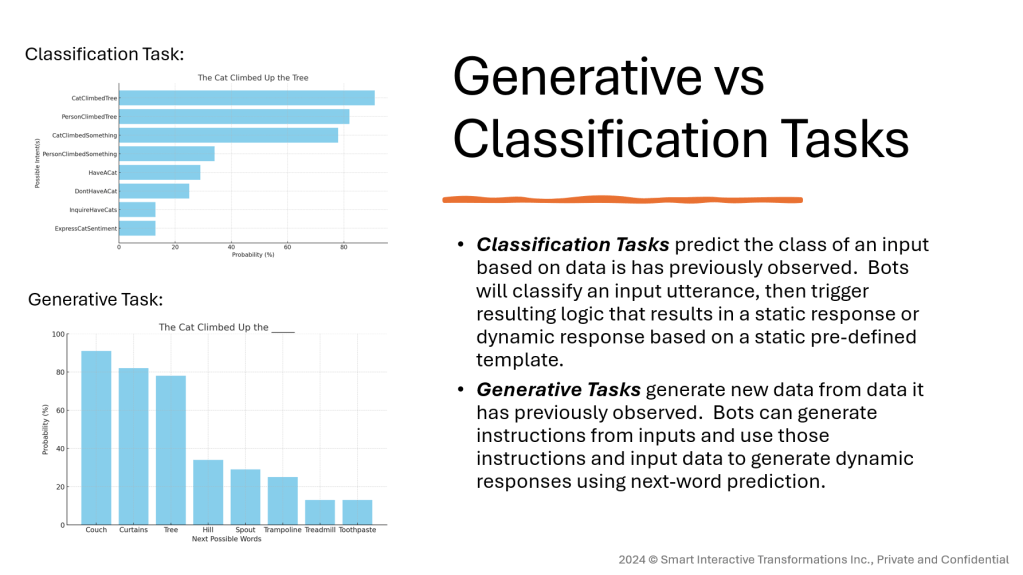
If you consider hallucinations for intent classification, it’s much more of a frustrating user experience because it shows the conversational solution 100% doesn’t understand what’s happened in the conversation. Essentially, the bot would respond based on misclassifying or not classifying what it just received as input. With generative tasks, you need to be an expert to detect hallucinations. It never “understands” you, but instead leverage inputs (prompts, RAG, external tools, etc.) and an immense amount of data to influence the probabilistic outcomes of the next word and generate a response.
The other slide is my favourite metaphor to contrast classification and generative efforts for data generation/curation. I liken their differences in requirements and efforts for acquiring data for conversations to firewall rule access list modes.
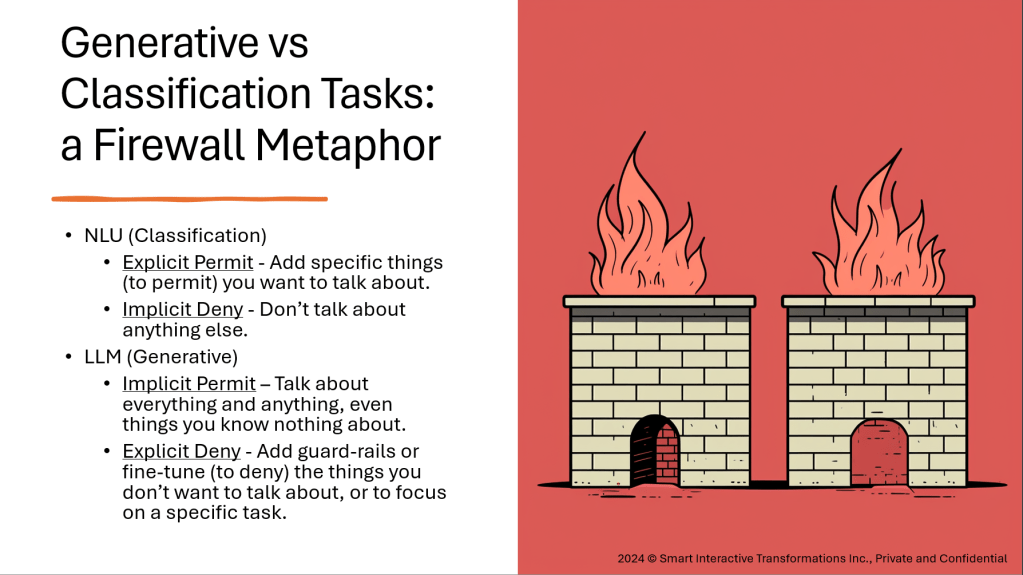
I’ve used many different approaches to acquiring training data for bots over the years:
| Approach # | Description |
| Approach #1 | Internal web forums with organization-wide input, Hand-tuned |
| Approach #2 | Hand-tuned utterances extracted from samples CRM support cases |
| Approach #3 | Tooling to ingest real transcripts and group utterances into suggested intents |
| Approach #4 | Generating data with Large Language Models (LLMs) |
Speaking from my own personal experience, I’ve spent far less time tuning training data in the field with data generated from LLMs than any of the other approaches. By all means, always start with analyzing real data when you can, but real data might not generalize as well as carefully crafted or generated data. Real data contains a lot of noise. You may also not be able to obtain it for various reasons. It’s best to use real-data to guide the generation and curation of data than to acquire real data and satisfy access and privacy compliance, analyze it, and hand-tune noise from existing data. When you’re working with real data, and there are insufficient examples for particular scenarios, something I’ve faced on multiple projects, you’ll need to generate it any way as a starting point.
Earlier we mentioned training data with common speech recognition transcription errors. You can even generate some of these mistranslations up front, hardening the base data against some speech recognition issues. When working with text data, spelling errors will be introduced.
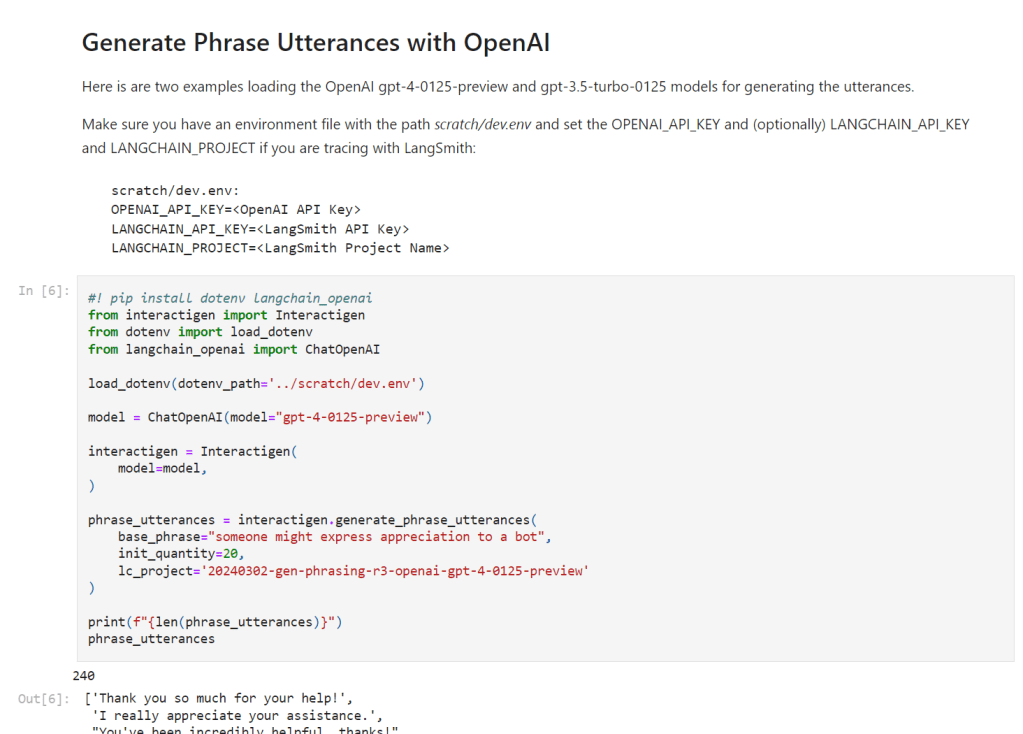
I’ve spoken about my approach to generate phrasing data in the past, but I’ve now open sourced a Python software module, Interactigen [5], built on LangChain [6] to generate phrasing data for intent classification, fine-tuning, and well, any other uses for generating natural language phrasings for use on voice or digital/text-based communication channels. I am usually a DIY module developer for new technologies, but with the incredible pace of change in the generative AI landscape, I caved and opted for any coding time savings I could find by abstracting away some of the boilerplate of communicating with common models and providers. The GitHub repository contains a Python notebook for generating training data phrasings with examples using OpenAI’s GPT4 and GPT3.5 [7], and Google’s Gemini Pro [8]. This is the very approach I use today to generate base training data before hand-tuning it and putting to test. I’ve used it in multiple production deployments successfully. Here is a brief look at getting started using OpenAI’s GPT4.
Switching to Google Gemini Pro is as simple as this:
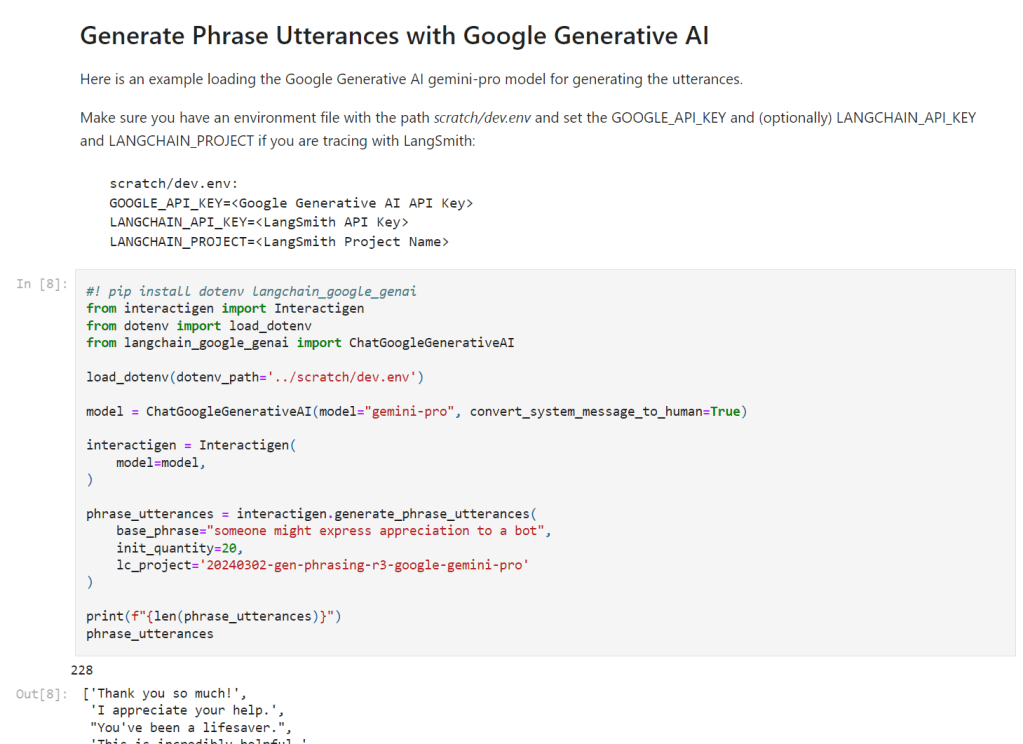
If you don’t have a LangChain API key or project, you don’t need them for the examples to work. I use these in combination with LangSmith [9] to get some basic usage visualizations and analytics for LangChain execution runs. For example, here is the view comparing runs between Google Gemini Pro, Open AI GPT4, and Open AI GPT3.5.
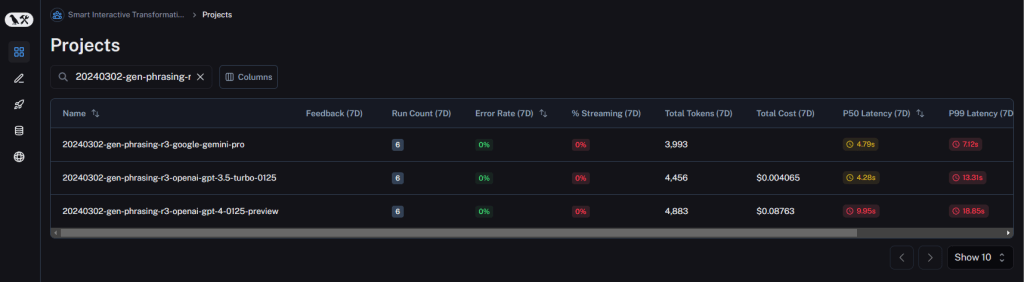
We can expand individual runs and look at the detailed exchange of prompts and outputs. It is fantastic for debugging batch jobs involving many calls to LLMs.

We’ll explore the next steps after generating this data, and how to monitoring and observe the effects of changes to this data in future blog posts.
Challenge #2 – Managing Goal-directed Sequences with Turns
I know I mentioned I wouldn’t get into Challenge #2, but I will at least share a few more slides I’ve produced covering the provisioning components for dialog management with Dialogflow CX, along with a few design pattern abstractions I’ve created on my own to simplify the design and maintenance of complex conversational flows.
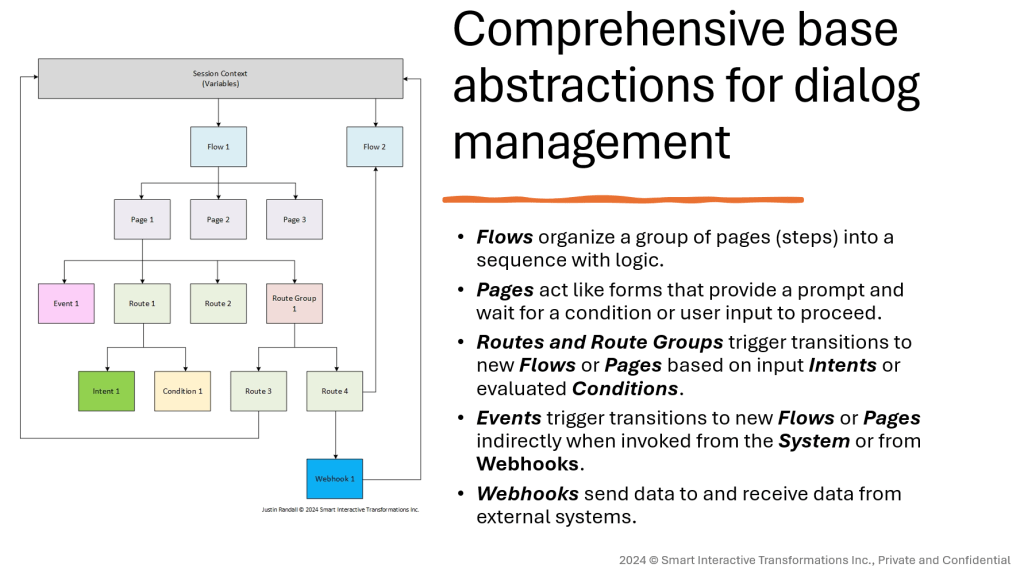
The general approach I have to conversations is that there is a main loop to which all turns pass through on each repair, completion, or failure of a turn. This ensures global and local counters are updated and threshold-based actions, like escalating after 3x fallbacks in the same turn of 7x fallbacks over in the conversation, can work correctly with minimal customizations per-Flow or per-Page.
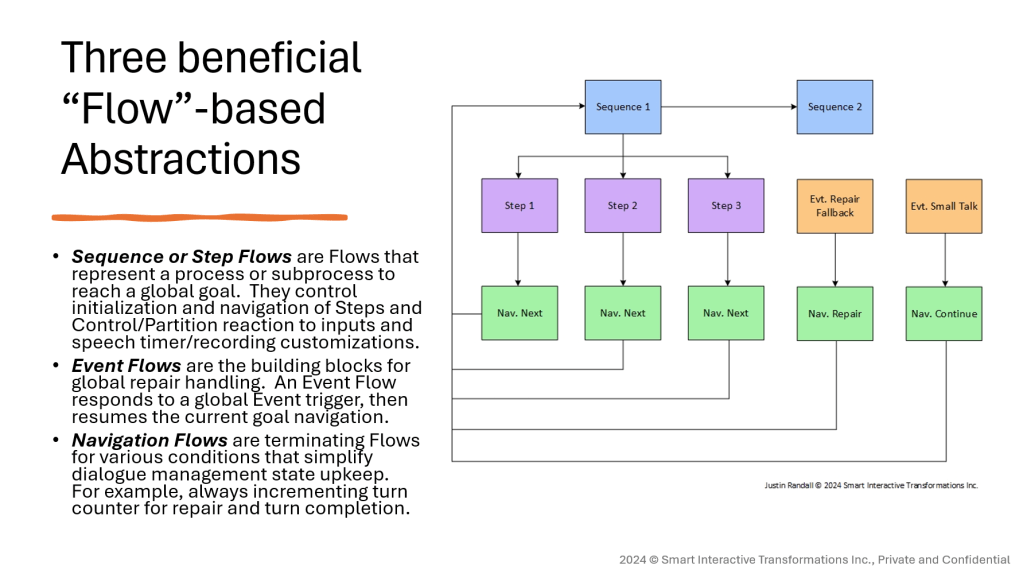
Using namespaces and separation of purpose for Flows design pattern has saved me tremendous effort in delivering robust solutions with a generic/hardened framework for handling primary conversations skills (repair, escalation, engagement pause/resume, and more), where only secondary conversational skills (the actual use cases) are customized per-solution.
Here is an example visualization of these patterns in action with one of the key flows for ScheduLarry – scheduling a follow-up date and time.

Challenge #3 – Analytics to ensure Financial, Functional, and Operational Success
There is a ton of information I want to cover for challenge #3, and we certain won’t even scratch the surface in this post. What I want to share in this article, however, is where I began with ScheduLarry and the MVP deployment. I promise we will add more advanced analytics capabilities around various other aspects to ScheduLarry in the coming blog posts, things I’ve done many times before, but here is where we begin our journey in my blog – exploring and visualizing the data available within ScheduLarry’s conversational AI platform, Google Dialogflow CX [10].
Dialogflow CX comes with some useful analytics features built right into its UI. I’m not going to cover those here. I will leave the reader to explore the official documentation [11]. What I will instead cover is some of the valuable information you can extract from Google BigQuery’s interaction log exports from Dialogflow CX [12], visualized through Grafana [13], probably my favourite data visualization tool. Grafana supports a wide range of data sources, including BigQuery via plugin. Note that it is critical at this stage to consider the necessity of implement PII and payment info redaction from Dialogflow CX interaction logs, but in the main UI and in the BigQuery exports [14].
Let’s start with the main overview dashboard for ScheduLarry. There are ultimately five dashboards that make up what I have deployed as basic analytics you can pull from BigQuery interaction logs:
| Dashboard Name | Description |
| ScheduLarry BigQuery Dashboard | The main dashboard with high-level KPIs, and drill-down capabilities into: Dialogflow CX conversation history, Dialogflow CX Audio Export Storage Bucket, additional tailored Grafana drill-down dashboards. |
| ScheduLarry BigQuery Escalations | Drill-down dashboard for Escalations. |
| ScheduLarry BigQuery Fallbacks | Drill-down dashboard for Fallbacks. |
| ScheduLarry BigQuery Intents | Drill-down dashboard for Intents. |
| ScheduLarry BigQuery Webhooks | Drill-down dashboard for Webhooks. |
Building these dashboards consists of creating dashboard containers and visualization panels that leverage the BigQuery interaction log exports as a data source.
The Main Dashboard (ScheduLarry BigQuery Dashboard)
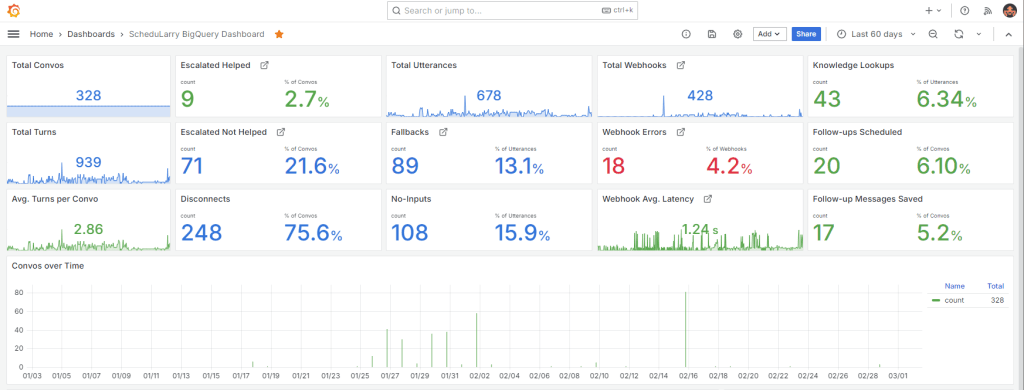
I won’t detail each KPI in this post, or it would be even longer than it already is, and much time will be spent improving this dashboard. Each of the box arrows next to a KPI label indicates a drill-down into a subsequent dashboard for further analysis. I will specifically call out the 2nd and 5th column of KPIs, which may not be as self-esplanatory.
The second column represents global outcomes of each conversation. I would normally have five metrics here, but some of these aren’t possible using the interaction logs in BigQuery alone. For example, I cannot separate “Disconnects” into “Abandons” and “Disconnected but Helped” (a.k.a. Contained). To do this, I need to leverage additional cloud services and a database to implement session expiration and journey tracking. Something we will absolutely cover in coming posts. You can see these components in ScheduLarry’s introduction article.
The fifth column represents value delivered. These will be the KPIs I use to compute financial metrics. There is a cost per-instance of handling this function. For example, every knowledge lookup and response from my website (think website FAQs), every follow-up scheduled, and every message relay recording saved (and emailed to me).
I’d like to state right now that a lot of this data is test data, I haven’t had 328 legitimate contacts to my business. A lot of these are even early-stage testing, where things didn’t always behave well (note the % of no-inputs). That’s the beauty of using the data that is natively exported from Dialogflow CX to BigQuery, you can plug-in these analytics at any point in time, and the data will be there. There are a few enhancements I’ve used for escalations by tracking the escalation cause as a variable, but everything else requires no customizations per Dialogflow CX bot instance.
Within each panel is a BigQuery query. Here is an example for rendering webhook average latency.
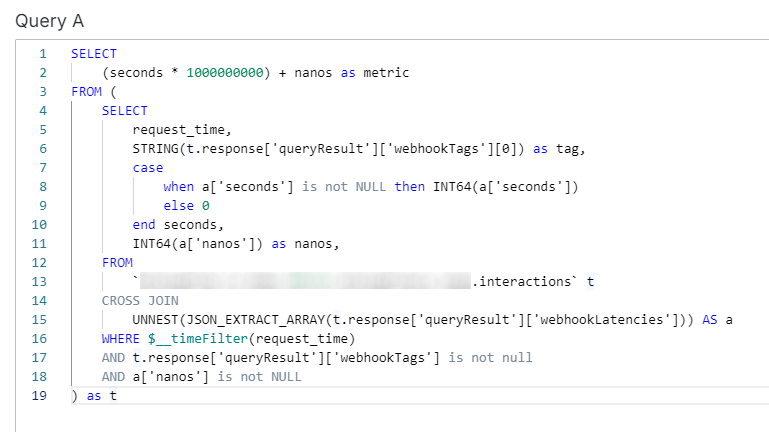
You may notice that it’s not actually calculating the average latency in this query, that’s happening in an aggregate function in the Grafana visualization panel options.
Below the high-level details on NLU intent confidence, and RAG knowledge chunk confidence and grounding. The NLU confidence captures how well each intent is understood (not excluding misclassifications). The RAG knowledge chunk shows hits and grounding scores against the Vertex AI datastore indexed from my website.
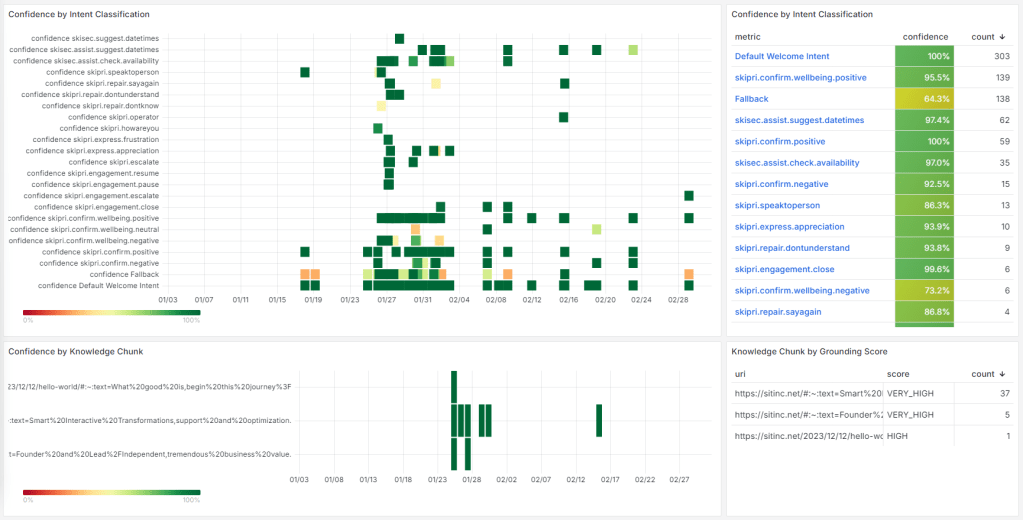
Lastly on the main dashboard, we have the detailed session logs.
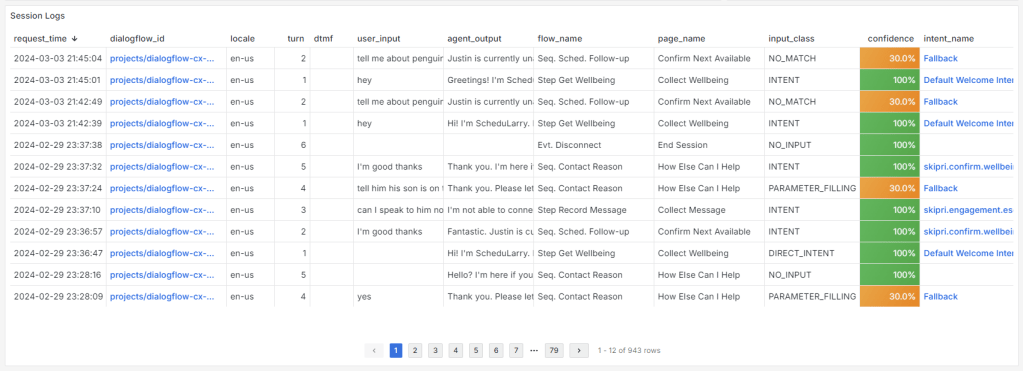
This first image is only part of the available columns. The dialogflow_id column will allow you to drill-down and load the conversation history within Dialogflow CX itself. The intent_name column will let you load the intent dashboard for further details around analytics. These are similar to the Fallback analytics page and won’t be shown here for brevity.

If we scroll over to see the rest of the columns displayed, we can see details around parameter setting, retrieved knowledge chunk payload and grounding, and even recording URIs that let you pull up the file in Google Cloud Storage bucket, or download the recording for review [15].

Note that if you’ve configured Data Loss Prevention [14] to redact information, it will be redacted in these session logs also. It is possible to set a redaction policy that is delayed, if you prefer to keep debugging information for a short-time before being scrubbed.
Drilling Down into Escalations


Most conversational AI platforms can tell us the number of escalated conversations. Some, including Dialogflow CX, can also provide insights on the location in the dialog where these escalations are occurring. None of them provide you the cause of the escalation. It’s with good reason, the nature of escalations is entirely custom to each deployment. To visualize the escalation causes by Page (or by Flow, or partition), simply set a context parameter to keep track of why interactions are escalating, and then you can visualize the results as above. Context parameters are set sequence and step names, as originating page and flow names are not associated with the escalation record, only the resulting ones.
Drilling Down into Fallbacks
Fallbacks can provide some of the most valuable information in any conversational AI solution: a window into what your customers are saying that you DIDN’T expect or plan for. Contact drivers are constantly evolving, and fallbacks can tell you where you need to improve you training data, or also expand conversational capabilities to handle things people are conversing about. For brevity here is a view of Fallbacks broken down by turn, but views also exist for high-level Sequences (custom context param) and Flows.

Beyond aggregation and time series statistics around fallbacks, we have the detailed utterances themselves. Someone sure wants to talk about penguins.
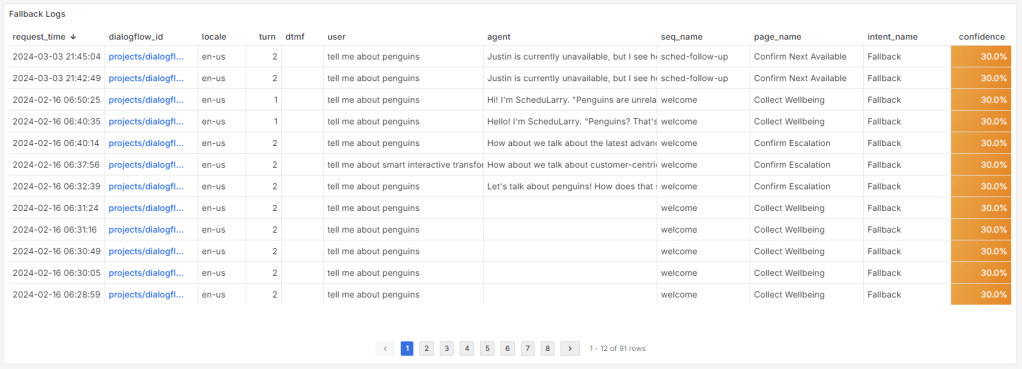
You should also query the data from this table periodically to extract and identify emerging contact drivers.
Drilling Down into Webhooks
Your conversational AI doesn’t live in a vacuum. I haven’t seen any vacuums equipped with VUIs… yet. Bad joke, I know. Webhooks are what connect Dialogflow CX to custom integrations for data lookup and changes across anything you can develop against that has a network-available API. Within Dialogflow CX, webhooks are ID’d with a “Tag” property that is sent to the Webhook API gateway you’ve created to connect your bot to external systems.
When things are going wrong with your external system integrations, this is where you want to be looking to verify everything is working as expected.

The above visualizes distribution and time series statistics for Webhook Tag (unique API actions) occurrences.

Here we look at the outcomes of the Webhooks, which breakdown the successful and failed outcomes of Webhooks, also broken down by tag (unique API action).

Lastly, we have the Webhook logs, which provide additional information about the detailed results of the Webhook API invocation.
Well, that was a lot, I know. If you actually made it this far, thank you for your focus and interest in what I have to share. What’s next for ScheduLarry? Come along for the read to find out!
Do you want to learn more about how to make use of these tools for your own deployments? Do you want to see these tools used live? Was this too much information and you want the TLDR (sorry!)? Please feel free to reach out or say hi. Want to see me talk live about more advanced analytics I’ve delivered, check out my previous post of the closing keynote I delivered at the Voice and AI ’23 conference in Washington, DC in September 2023.
References
| [1] | Google, “Speech adaptation,” Google, [Online]. Available: https://cloud.google.com/dialogflow/cx/docs/concept/speech-adaptation. [Accessed 02 03 2024]. |
| [2] | Google, “Tune language foundation models,” Google, [Online]. Available: https://cloud.google.com/vertex-ai/generative-ai/docs/models/tune-models. [Accessed 02 03 2024]. |
| [3] | Microsoft, “Recommendations for LLM fine-tuning,” Microsoft, [Online]. Available: https://learn.microsoft.com/en-us/ai/playbook/technology-guidance/generative-ai/working-with-llms/fine-tuning-recommend. [Accessed 02 03 2024]. |
| [4] | OpenAI, “Fine-tuning,” OpenAI, [Online]. Available: https://platform.openai.com/docs/guides/fine-tuning. [Accessed 02 03 2024]. |
| [5] | J. Randall, “interactigen-py | GitHub repository,” Smart Interactive Transformations Inc., [Online]. Available: https://github.com/sitinc/interactigen-py. [Accessed 02 03 2024]. |
| [6] | LangChain, “LangChain,” LangChain, [Online]. Available: https://www.langchain.com/. [Accessed 02 03 2024]. |
| [7] | OpenAI, “Models,” OpenAI, [Online]. Available: https://platform.openai.com/docs/models. [Accessed 02 03 2024]. |
| [8] | Google, “Gemini – Google DeepMind,” Google, [Online]. Available: https://deepmind.google/technologies/gemini/. [Accessed 02 03 2024]. |
| [9] | LangChain, “LangSmith,” LangChain, [Online]. Available: https://www.langchain.com/langsmith. [Accessed 02 03 2024]. |
| [10] | Google, “Dialogflow | Google Cloud Platform,” Google, [Online]. Available: https://cloud.google.com/dialogflow?hl=en. [Accessed 02 03 2024]. |
| [11] | Google, “Dialogflow CX documentation – “Logging and history” and “Agent quality” sections,” Google, [Online]. Available: https://cloud.google.com/dialogflow/cx/docs. [Accessed 02 03 2024]. |
| [12] | Google, “Interaction logging export to BigQuery,” Google, [Online]. Available: https://cloud.google.com/dialogflow/cx/docs/concept/export-bq. [Accessed 02 03 2024]. |
| [13] | Grafana Labs, “Grafana: The open observability platform,” Grafana Labs, [Online]. Available: https://grafana.com/. [Accessed 02 03 2024]. |
| [14] | Google, “Redacting PII data in Dialogflow CX with Google Cloud Data Loss Prevention (DLP),” Google, [Online]. Available: https://cloud.google.com/blog/topics/developers-practitioners/redacting-pii-data-dialogflow-cx-google-cloud-data-loss-prevention-dlp. [Accessed 02 03 2024]. |
| [15] | Google, “Agents | DIalogflow CX | audio-export-bucket,” Google, [Online]. Available: https://cloud.google.com/dialogflow/cx/docs/concept/agent#audio-export-bucket. [Accessed 02 03 2024]. |

 Smart Interactive Transformations Inc.
Leave a comment