

It doesn’t matter if we’re working on the most cutting-edge of technologies, we can’t skip the fundamentals of infrastructure and automation. I’m going to keep this blog post relatively short, but I will leave the reader to explore a useful GitHub template repository for rapidly building Dialogflow CX applications and infrastructure with Google Cloud Platform. This is an ode to those technical projects that don’t get the same love as product/feature launches, but that result in transformative impact in project delivery speed and positive outcomes for many operational scenarios.
I’ve been automating infrastructure for my entire career. I remember the excitement of the first time I saw a machine come online, and get fully imaged through PXEBOOT, kickstart, and lots of shell scripts and Perl that I slaved over for weeks. This would later become the foundation that helped seamlessly migrate a distributed carrier grade telco platform serving production consumers and businesses from physical to virtual machines. Those kinds of projects never get the love they deserve as they don’t directly generate new revenue or save on cost, but they make you feel good because things went as expected instead of some other horrible alternative.
If you’ve ever had to be on-call for a 24/7/365 service, like making sure people can use the internet, call 911 or their loved ones, or watch television (and many others), you know the fear getting calls when those systems that haven’t been properly automated or managed, or worse, forgotten go bump in the night. You know the ones. The ones you don’t even want to reboot because it’s been running so long, you’re not sure if it’ll come back up because you’re not sure what to expect, and you certainly want your on-call engagement to just end, rather than extend for another 8-12hrs while trying to reinstall some archaic out-of-service solution with docs from 20+ years ago for Solaris 8 on a Netra v120 with the supplier (if there is one still in business!) reminding you repeatedly the solution of out-of-support.
I shed that fear a long time ago by making sure I didn’t build systems that couldn’t be restored in as much of an automated way as made sense. Solaris, OpenBSD, FreeBSD, RHEL, CentOS, and many other operating systems all had ways of performing non-interactive installations, which usually involved downloading assets from NFS or HTTP and running bash or Perl scripts to do the custom stuff after the OS was imaged.
I wasn’t as wow’d when you could package virtual machines using standardized tools. It didn’t really speed up what we were already doing with PXEBOOT/kickstart, as we had an approach for imaging VMs across geographies and data centres. It couldn’t help me with my biggest thorn: waiting for resource allocation approvals from another department, for VMs or bare-metal machines, sometimes even waiting for maintenances to shuffle around or deploy new capacity (ahhh pre-cloud…).
I was impressed when containers came to be, as we now had more under our control (bare-metal Kubernetes clusters) and could deploy small services very rapidly and elastically without bothering IT as we had fine-grained control over capacity. Still, we spent a good amount of effort maintaining and troubleshooting the “oh what fun” experience it was to be an early adopter of running your own k8s clusters. Along with the wonders of this new approach to development and deployment came running into new issues like needing to restart core-dns regularly because it would just start randomly replying with incorrect IPs for internal service communications. Our network-wide DNS server clusters never did that!
To this day, nothing truly ever blew my mind than adopting cloud for the first time, which happened upon me by force. I spent most of my career in telecommunications service providers, and they are the gatekeepers to the clouds. They will always need data centres for housing regionalized networking equipment and content delivery systems by services like Netflix and many others. When I finally left and went to work at a big tech company, I was in a function that didn’t have a lab where I could just build what I wanted and explore my ideas. I only had access to what was free or what I felt comfortable paying for out of pocket. I had to figure out a way to use cloud for cheap.
Fast-forward to today, I have fallen in love with the peace of mind that cloud brings to almost everything. From knowing that the best and brightest at some of the largest technology companies in the world and taking care of infrastructure 24/7/365 using a follow-the-sun approach, to standardization of infrastructure-as-code tools to simplify re-usable abstractions to declare automated implementations across various infrastructure providers. I can run container workloads with someone else worries about restarting core-dns.
I mentioned in the first article about ScheduLarry that there is much automation that needs to occur. The first steps are the infrastructure for the application itself. I’m working on integrating a new component for parsing out dates and times more efficiently using large language models (LLMs) through webhooks, but before I start building out experiments with additional infrastructure components, I desperately need a way to reproduce and manipulate environments quickly.
In producing what I need to move more quickly with ScheduLarry’s development, I saw a clear opportunity to offer value to those wanting to get started with Dialogflow CX. I had a few experiences lately that made it quite clear that many businesses genuinely want to use Dialogflow CX with their existing contact centre solutions but don’t know where to begin. The most certainly aren’t thinking about creating their own infrastructure deployment automation at this stage.
In my opinion, to truly get the most benefit out of your Dialogflow CX deployment, you should be using conversational AI as a lens into the customer – that means exporting interactions, both audio and transcripts. It means integration Dialogflow CX with other systems through webhook API gateways. If you haven’t approached these solutions for the first time, it can be overwhelming trying to figure out the best way to connecting everything together. Experimentation can be very costly, especially when you maintain infrastructure manually.
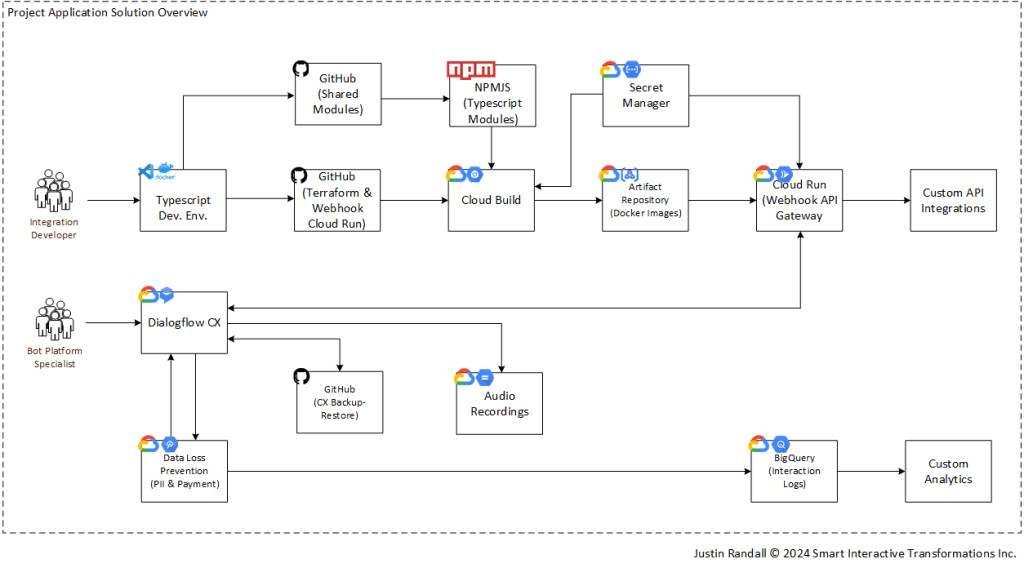
I submit to you the first of a few GitHub Dialogflow CX application project templates with infrastructure as code and implementations in various programming languages. The project deploys “prod” and “uat” (test) versions of Dialogflow CX agents, synched through GitHub branches, connected to respective “prod” and “uat” webhook API gateways running as Cloud Run services. Data loss prevention is pre-configured to redact more than 77 types of identifiable information. Audio storage for phone call interactions leverage a Cloud Storage bucket. Dedicated service accounts are used with least permissive permissions.
The GitHub template repo URL: https://github.com/sitinc/dialogflowcx-webhook-tsdocker-template
To break it down, you create a new repository in your own GitHub account based on this template and follow the instructions on the main GitHub page to get the environments live.
There are pre-requisites to get going like having a working Google Cloud Platform and GitHub account, but the goal is that you should be able to go from a fresh empty Project, to fully configured and running in under 10 minutes.
After those magical 10 minutes, you should have this deployed:
Of course, you can do this all by hand. Here’s the dependency graph from Terraform, the infrastructure-as-code (IaC) tool used in the template to scaffold the Google Cloud Platform components into service.
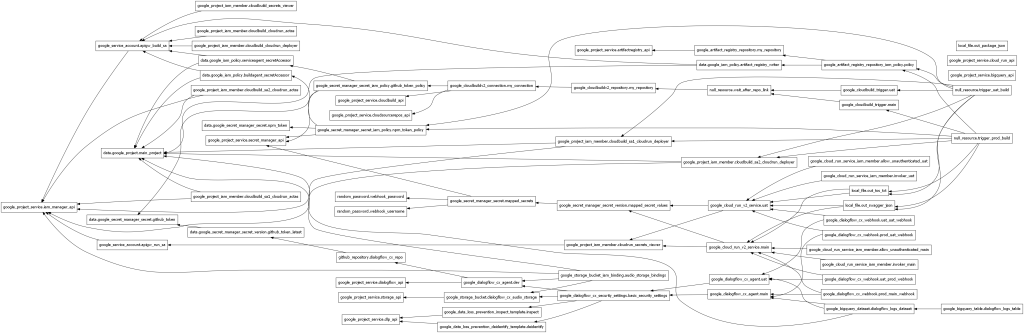
Use the automation as a tool to understand the components behind getting Dialogflow CX and ancillary cloud services operational.
My next installment will be an equivalent template for Python and for Java. Then I’ll be adding test/training data splitting for our earlier generated NLU data from previous blog posts, and that new LLM component for improving the extraction of various dates and times in ways that aren’t possible with a purely intent/entity-driven approach.
Happy coding and deployment! 😊 Need help getting it working? Please reach out and say hello!

 Smart Interactive Transformations Inc.
Leave a comment